Engineers are available to assist.

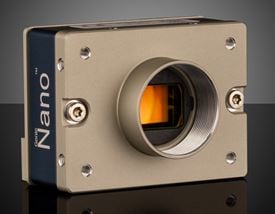
Teledyne DALSA Genie ™ Nano 5GigE Cameras (Front)



Teledyne DALSA Genie™ Nano 5GigE Cameras are available with a range of SONY Pregius sensors with resolutions from 3.2MP to 12.4MP. The 5GigE Ethernet interface provides data transfer speeds up to 5 times faster than the conventional GigE interface, which when combined with TurboDrive™ technology allows these cameras to achieve frame rates up to 187fps while retaining full image quality. The included Sapera CamExpert software provides a simple image acquisition interface with Sapera LT SDK libraries for OEM and system integration applications. Teledyne DALSA Genie™ Nano 5GigE Cameras are packaged in a compact, lightweight and robust all-metal housing, making them ideal for electronics inspection, industrial automation, and Intelligent Traffic Systems (ITS) applications. These cameras support the AIA GigE Vision Standard to facilitate easy integration into imaging systems.
Note: Frame rates achievable through TurboDrive™ or Burst Acquisition could vary with factors such as image quality and resolution.
Sapera LT is a free image acquisition and control software development toolkit (SDK) for Teledyne DALSA’S 1D cameras / 2D cameras / 3D Laser Profiler cameras and frame grabbers. Hardware independent in nature, Sapera LT offers a rich development ecosystem for machine vision OEMs and system integrators. Sapera LT supports image acquisition from cameras and frame grabbers based on machine vision standards including GigE Vision™, CameraLink®, CameraLink HS™, CoaXpress®, and USB3 Vision™.




or view regional numbers
QUOTE TOOL
enter stock numbers to begin
Copyright 2023, Edmund Optics India Private Limited, #267, Greystone Building, Second Floor, 6th Cross Rd, Binnamangala, Stage 1, Indiranagar, Bengaluru, Karnataka, India 560038
California Consumer Privacy Acts (CCPA): Do Not Sell or Share My Personal Information
California Transparency in Supply Chains Act
The FUTURE Depends On Optics®